 Tiếng Việt
 English
 Chinese
 Japanese
 Korean
 Thai
Thai Russian
Bit - Animation Editor
Phát triển bởi: Morgondag
Ngày phát hành
4 Thg09, 2020
Nhà xuất bản
Morgondag
GIỚI THIỆU TRÒ CHƠI
COMPOSE AND DESIGN ANIMATED PIXEL ART
This is not a drawing tool.
A NEW COMPOSITION TOOL
Design pixel-art paintings, art pieces, game assets, and compose interesting animations and combinations from sprites or sprite sheets with Bit - Animation Editor.POWERFUL EXPORT OPTIONS
Bit - Animation Editor has a wide range of easy to use export options. Export to GIFs, pictures, data packages for game engines, or to a standalone desktop application.IT'S ALL ABOUT SCENE ANIMATION AND ASSET COMPOSITIONS
FEATURES
Asset Management
Import pixel-art parts and sprites, configure sprite sheet tiles, and compose new sprite sheet animations.
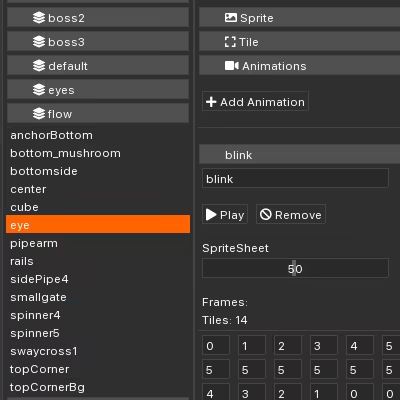
Scene Editor
Highly performant scene editor that lets you focus on composition while running sprite sheet animations and custom tweening animations at the same time.
Powerful Asset Configurations
- Layering and scene scaling for easier composing.
- Smart mirroring and pattern repetition for strong symmetrical designs.
- Tweening built-right in for interpolating any attributes and bringing compositions to life.
- Color tinting, alpha rendering and simple rotations for further customization.
Palettes and Colorization
Replace colors and combine assets under one color schema and import and export color themes between projects.
Strong Export Targets
- Export as picture, time-lapse, or animation sequences.
- Export as GIF and customize frames.
- Export MP4 videos.
- Export art as a standalone desktop application.
- Export data packages with JSON for game engines.
- In-app link to offer the possibility to import projects from Unity.
FAQ
WHAT IS BIT ANIMATION EDITOR?A composition tool used to make animated pixel art.
WHY DID YOU MAKE THIS?
We made an internal tool to create animated art as well as to export assets to our games. Bit - Animation Editor is the refined version of that tool.
CAN YOU EXPORT TO GIF?
Yes! It's built right in! You can easily select the number of frames to include, how many frames to skip, and for how long each frame should be displayed in the GIF. Design and export.
CAN YOU PAINT PIXEL ART WITH IT?
No! The tool is used for composition and animation only! You import pixel art into the editor and use that to create your scene.
ARE THERE ANY ART ASSETS INCLUDED?
Yes, and a demo project showing how everything is setup. Importing PNG sprites and sprite sheets is super easy.
WHAT IS THE BENEFIT OF BIT ANIMATION EDITOR?
You can easily create and author sprite animations out of sprite sheets. It's also super easy to export to GIF, PNG and game engine friendly data formats. Moreover, you can even create a standalone windows desktop app from your composition. It's also possible to import your compositions to Unity with our free Unity plugin that can be installed into your individual game project.
HOW DO YOU SETUP ANIMATIONS?
There are several ways! Create sprite sheet animations, rotations, or create sequences of powerful tweening animations that can animate all the asset's settings like position, rotation, mirroring, etc.
CẤU HÌNH YÊU CẦU
Tối thiểu:
- Yêu cầu vi xử lý và hệ điều hành đều chạy 64-bit
- HĐH: Windows 10
- Bộ xử lý: Intel Core i5 2.00 GHz or AMD equivalent
- Bộ nhớ: 1 GB RAM
- Đồ họa: Discrete GPU
- Lưu trữ: 12 MB chỗ trống khả dụng
- Ghi chú thêm: Minimum screen resolution of 1024x768
Khuyến nghị:
- Yêu cầu vi xử lý và hệ điều hành đều chạy 64-bit
- HĐH: Windows 10
- Bộ xử lý: Intel Core i7 2.00 GHz or AMD equivalent
- Bộ nhớ: 8 MB RAM
- Đồ họa: Hardware Accelerated Graphics with 1GB memory
- Lưu trữ: 1 GB chỗ trống khả dụng
- Ghi chú thêm: screen resolution of 1920x1080
Nền tảng
STEAM249,000đ
Sản phẩm đang tạm hết hàng
CÂU HỎI THƯỜNG GẶP (FAQ)
Sản phẩm này có hỗ trợ chơi online không?
Hầu hết các game Steam bán trên KeyGame đều hỗ trợ tính năng Online/Multiplayer đầy đủ (trừ các tựa game thuần Single-player). Vui lòng xem kỹ phần Tính năng game trên Steam để biết thêm chi tiết.
Sau khi mua tôi nhận Key ở đâu?
Ngay sau khi thanh toán thành công, Mã Key/Tài khoản sẽ được tự động hiển thị trên màn hình Lịch sử Đơn hàng của bạn. Bạn cũng có thể vào phần Tài khoản > Đơn hàng để xem lại Key bất cứ lúc nào.
Chính sách bảo hành như thế nào?
KeyGame bảo hành trọn đời cho toàn bộ Game Bản Quyền. Nếu Key bị lỗi lúc nhập, hoặc tài khoản bị thu hồi trái phép (hiếm khi xảy ra), chúng tôi cam kết hoàn tiền 100% hoặc đổi Key mới ngay lập tức.